Mission Control Portal - AI Chat Support Assistant
The Telnyx AI Assistant is the first point of contact for support through chat in our Mission Control Portal. It can help with documentation and account troubleshooting. Human assistance is provided through support tickets created by the AI agent.
You can access the AI Assistant on the left hand side navigation bar, as seen in the image below. Simply click "Ask our AI Assistant" and the widget will pop up from the bottom right hand side of your mission control portal account.
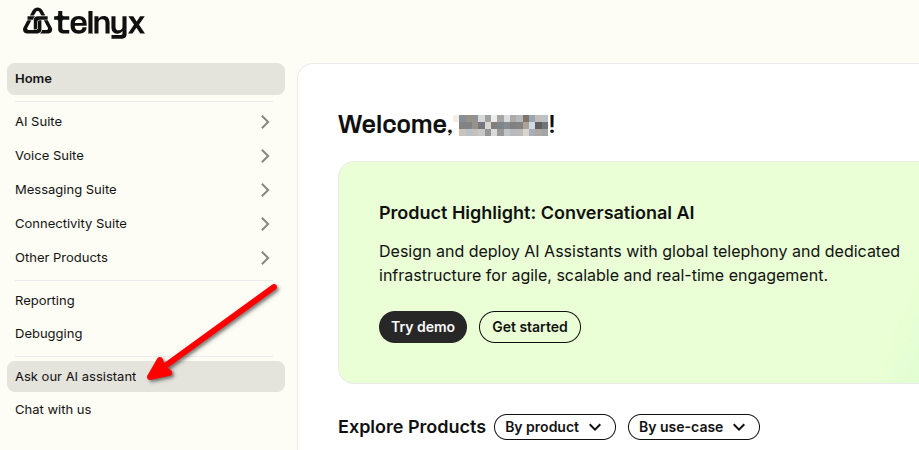
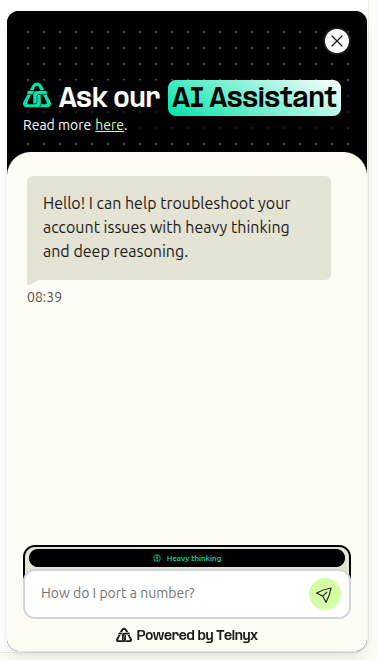
How to Interact with the AI Assistant
Ask our AI Assistant: Your go-to tool for answers about Telnyx products always at your fingertips.
It pulls from our Support Center (support.telnyx.com), Developer Docs (developers.telnyx.com), and main website (telnyx.com) to deliver the most relevant info instantly.
Whether it’s a simple question or a more technical one, the Assistant uses our documentation and has read-only access to your portal account resources that can help troubleshoot.
Start a chat with our AI support agent. If your issue requires human assistance, ask it to escalate your case and it will automatically create a support ticket.
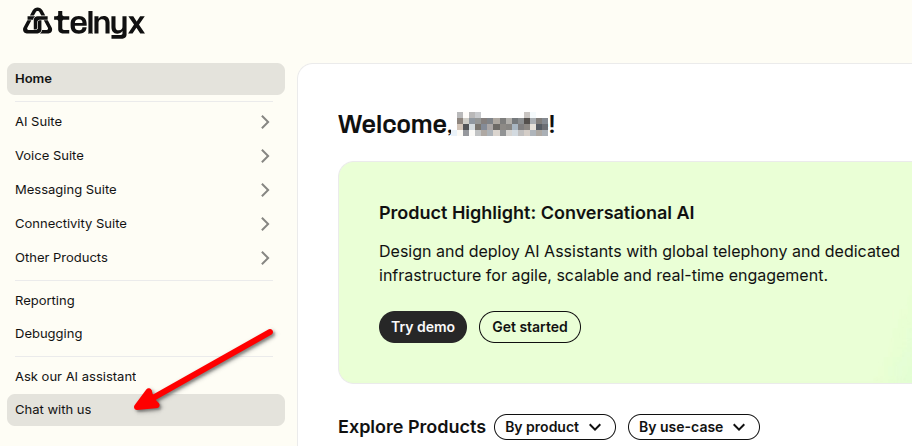
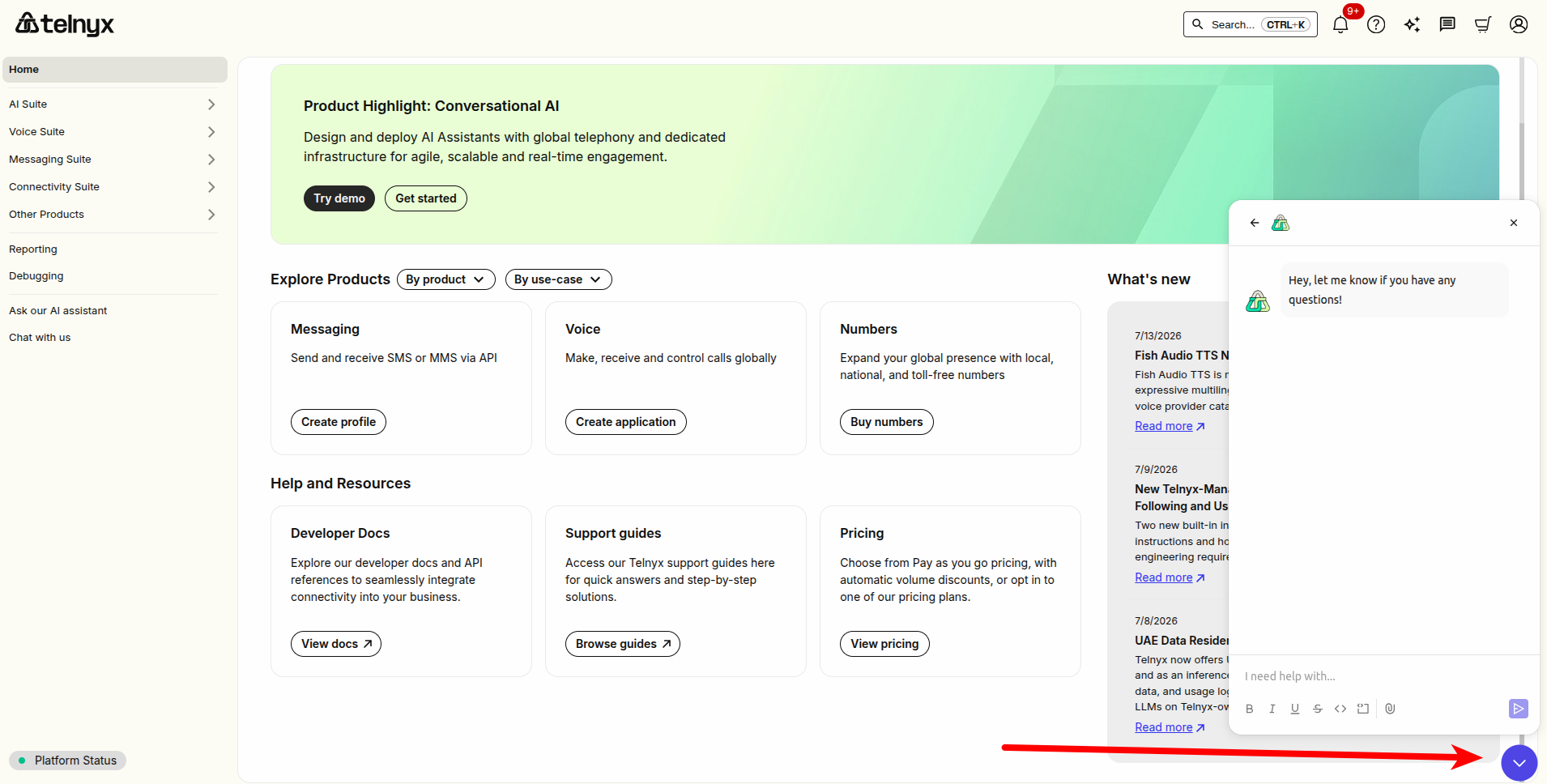
After the Assistant responds, you can ask another question by typing into the chat box. If you need human assistance, ask it to escalate your case and create a support ticket. Human support is provided through tickets, rather than within the chat.
What can the AI Assistant cover?
The AI Assistant answers questions from our documentation and can look into your own account, read only, to find out why something is not working. The more specific you are, the better the answer. Name the product, describe what you expected and what happened, and include any identifier you have: a call ID, a porting order support key (SR_XXXX), a TCR campaign or brand ID, a SIM's ICCID, or an AI Assistant ID.
Product and Developer Questions
- How Telnyx products, APIs, SDKs, and configuration work, answered from the Support Center, Developer Docs, and telnyx.com. Ask for code snippets and the Assistant will include them.
- Example: "How do I configure a webhook for inbound SMS?"
Voice Call Troubleshooting
- Diagnoses call failures, one-way or missing audio, dropped calls, and call quality issues, including calls that pass through queues, conferences, and transfers. It returns the likely root cause and recommended next steps.
- Supply the call ID (RTC session ID, call session ID, call leg ID, or call control ID).
AI Assistants (Voice AI)
- Lists the AI Assistants on your account with their configuration, reviews one assistant in detail, or explains why an assistant behaved as it did on a specific conversation, including whether the cause is your configuration or the Telnyx platform.
- Covers unexpected or empty replies, interruptions, tools that fail or never run, and knowledge-base documents that are not retrieved. Supply the conversation ID or call control ID of the affected conversation for the most specific answer.
Porting
- Looks up your porting orders: status, FOC dates, carrier, rejection and exception details, required documents, portability, and activation status. Supply the porting order support key (SR_XXXX) or the phone number.
- Also answers general porting questions, such as which documents are required to port numbers in a given country.
10DLC Registration
- Explains why a 10DLC campaign was declined and what to change before you resubmit, checks your opt-in website, and investigates brand failures and sole-proprietor verification. Supply the TCR campaign or brand ID.
- Also helps you draft compliant campaign fields and explains 10DLC registration requirements.
Wireless SIMs
- Diagnoses why a SIM has no data, cannot attach, keeps disconnecting, or fails while roaming, and whether the problem is on the device side or the network side.
- Reports SIM state, data plan, SIM group, data limits, usage, current network registration, and whether VoLTE is enabled. Supply the ICCID, IMSI, MSISDN, or SIM ID.
Billing and Account Status
- Your current balance and available credit, commitment spend, promo credits, and the rates your account is actually on for a given service or country.
- Why your account is blocked or limited, your identity verification status, and what is stopping an upgrade or signup, such as a verification code that never arrived.
Pricing and Number Coverage
- Current public list prices for Telnyx products, read live from our pricing data.
- Which number types (local, toll-free, mobile, national) and features (voice, SMS, MMS, fax, emergency) Telnyx offers in a specific country, including whether recipients can reply to your messages.
Other Products
- For products not listed above, such as messaging profiles, the Assistant inspects your account configuration to find the cause. Coverage keeps growing, so ask even if your product is not named here.
Feature Requests and Portal Bugs
- Search, vote on, or file feature requests on our public Soundboard. Votes and requests are recorded against your own account.
- Report a reproducible Mission Control Portal bug. Include the page URL, what you expected, what happened, and the steps to reproduce it. You will receive a tracking reference for the report.
Human Support
- If the Assistant cannot resolve your issue, or the issue needs a change only Telnyx can make, ask it to escalate your case. It will automatically create a support ticket and share the ticket number. Our team replies to the email address on your account.
- Examples of requests that need a ticket: explaining a specific invoice charge, refunds, resetting verification attempts, and other account changes.
24/7 Availability
- Our AI Assistant is available around the clock. However, as we rely on a third-party provider, it may experience degradation from time to time. We will clearly display when the Assistant is not performing at its expected levels. Human assistance is provided through support tickets created by the AI agent, rather than within the chat. The best way to provide feedback is by selecting the thumbs up and thumbs down buttons on a per-message basis.
Limitations and Complementary Use
The AI Assistant may not be able to resolve every query or complete requests that require human intervention. Ask it to escalate your case and it will automatically create a support ticket for our team to review and follow up.
Chat conversations are handled by AI agents. Your conversations are saved to your account, so you can return to them after refreshing the Portal or logging out. Conversations are used only to provide and improve support, and are not used to train AI models.
Accessing the AI Assistant through the A2A Protocol
In addition to accessing the AI Assistant through Mission Control Portal, customers can now connect their own AI agents directly to the Telnyx AI Assistant using the Agent-to-Agent, or A2A, protocol. A2A enables customer-built agents, applications, and automated workflows to programmatically ask the Assistant questions about Telnyx products, configuration, and account specific issues. This allows automated systems to receive the same first level support and troubleshooting guidance available to users in Mission Control Portal.
What can customer agents do?
Customer agents can use the same capabilities described in "What can the AI Assistant cover?" above: documentation questions, voice call, AI Assistant, porting, 10DLC, and wireless SIM troubleshooting, billing and account status lookups, public pricing and number coverage, feature requests, Mission Control Portal bug reports, and support tickets.
When authenticated with a Telnyx API key, the Assistant has read only access to relevant resources within the associated Telnyx account. Responses are scoped to the authenticated account.
The Assistant cannot change your account configuration, provision services, or update resources through the A2A interface. The only actions it takes on your behalf are opening a support ticket, filing or voting on feature requests, and reporting Mission Control Portal bugs.
Connecting through A2A
Customer agents can send requests to the following endpoint:
https://api.telnyx.com/v2/support_agent/support/a2a
Requests must:
- Use the JSON-RPC 2.0 format.
- Be authenticated using a valid Telnyx API key.
- Include sufficient context for the Assistant to understand the product, resource, or issue being investigated.
Agents can also discover the Assistant’s available capabilities through its publicly accessible agent card:
https://api.telnyx.com/v2/support_agent/support/a2a/.well-known/agent-card.json
The agent card does not require authentication and describes the skills and functionality currently supported by the Telnyx AI Assistant.
Why use A2A?
A2A support is designed for customers building AI agents that interact with Telnyx products and APIs. Instead of requiring a person to manually open Mission Control Portal whenever an automated system encounters an issue, the customer’s agent can query the Telnyx AI Assistant directly.
For example, an agent could:
- Ask how to configure a Telnyx product or API.
- Request relevant documentation for an implementation.
- Investigate why an account resource is not behaving as expected.
- Gather troubleshooting guidance before requesting human review through a support ticket.
This helps AI agents operate more independently while still giving customers a path to human assistance through support tickets when an issue requires further investigation.
Important considerations
The A2A interface is intended to complement, not replace, the Telnyx Support team. Responses may occasionally be incomplete, incorrect, or based on outdated information. Customers should validate important guidance before making production changes.
For complex issues, requests requiring account changes, or questions the Assistant cannot resolve, use the AI support chat in Mission Control Portal. Ask the AI agent to escalate your case and it will automatically create a support ticket.
Requests made through A2A may be processed using the same artificial intelligence systems and subprocessors described in this article. Customers should avoid including unnecessary personal, confidential, or sensitive information in their requests.
By using our AI Assistant
- You agree to the processing of personal data, which is necessary to provide our support services.
- Your data is stored and processed by Telnyx in the United States.
- The AI Assistant's answers are generated by AI models hosted by Telnyx on our own infrastructure. Some supporting steps, such as safety checks and response formatting, are processed by OpenAI, a subprocessor located in the United States.
- Your conversations are used only to provide support to you and to improve the quality of our support service. They are not used to train AI models.
- We retain personal data only as long as necessary to provide our services or as required by law, rule or regulation.
- Our services involve automated decision-making, including the use of artificial intelligence to answer your questions and troubleshoot your account.
- The Assistant may return incorrect or outdated information. If you need human assistance to clarify its guidance, ask it to escalate your case and it will automatically create a support ticket.