Branded Calling helps the people you call recognize your outbound SIP trunking calls by showing approved brand… See Telnyx guidance and requirements.
Branded Calling works with your Telnyx SIP trunking outbound calls. Once your brand and numbers are approved, calls placed through your SIP connections may include your verified branded information, where supported by the receiving carrier and device.
Important: Branded Calling currently applies to US-to-US calls placed to US mobile numbers serviced by T-Mobile and Verizon only.
Branded Calling is a verified feature. Your brand details and phone numbers must be reviewed before they can be used. Display is not guaranteed on every call. See Why Branded Calling may not appear on every call for a detailed explanation.
Before you begin
Make sure you have the following ready:
- An eligible Telnyx account and Enterprise profile. Some account or verification requirements may apply before provisioning is available.
- Eligible Telnyx phone numbers that are verified, active, and owned by your account. These are the numbers you will use as outbound caller ID on your SIP trunking calls.
- Accurate brand information, including the legal business name, display name, business details, and contact information.
- Display Identity Record details, such as your preferred display name and call reasons.
- A logo, if supported for your setup. Use a clear, brand-owned image that matches your business identity.
- Understanding of display limitations. Branded Calling currently applies to US-to-US calls to US mobile numbers serviced by T-Mobile and Verizon. See Why Branded Calling may not appear on every call for details.
How Branded Calling works
When you place an outbound call through your Telnyx SIP connection from an approved number, Telnyx attaches verified identity information to the call signaling before routing it to the destination network. This identity information is delivered using industry-standard protocols built on top of STIR/SHAKEN.
STIR/SHAKEN is the regulatory framework for call authentication in the United States. It uses digital certificates and cryptographic signatures to verify that the calling party is authorized to use the originating phone number. Telnyx signs calls according to STIR/SHAKEN attestation levels (A, B, or C) based on the verified relationship between the caller and the calling number.
Branded Calling extends this foundation by adding additional identity fields beyond what standard STIR/SHAKEN provides. These extra fields can include:
- Display name: your verified business name shown to the called party
- Call reason: a brief description of why the call is being placed (for example, "Account notification" or "Delivery update")
- Logo: a verified brand logo rendered on supported devices
- Business identifiers: additional verification metadata that downstream carriers and devices can use to validate the caller's identity
These fields are attached to the call signaling and propagated through the PSTN to the receiving carrier, which then decides whether and how to present them to the called party.
Why Branded Calling may not appear on every call
Even when your Display Identity Record (DIR) is approved, your numbers are active, and your call signaling is fully RFC-compliant, the branded information may not reach the recipient's screen. This is an inherent limitation of how Branded Calling works across the telecommunications network:
- Receiving carrier support varies. Not all carriers have implemented the infrastructure to consume and render Branded Calling identity fields. A carrier that does not support these extensions will simply ignore them and route the call normally. The call still completes, but no branded information is displayed.
- Device support varies. Even when the receiving carrier supports Branded Calling, the end user's device must also be capable of rendering the branded information. Older devices, unsupported operating systems, or devices with alternative dialer apps may not display branded content.
- Network path differences. Calls may traverse different interconnection paths depending on routing, time of day, and carrier agreements. Some paths may pass through intermediate carriers that strip or do not forward the additional identity fields, even though doing so is not compliant with the relevant RFCs.
- Provisioning and propagation delays. After approval, your branded identity must be provisioned and propagated across carrier databases. Branding may not appear immediately for all destinations.
- Destination and carrier limitations. Branded Calling currently applies to US-to-US calls placed to US mobile numbers serviced by Verizon and T-Mobile only. Calls to landlines, international numbers, or numbers on smaller or regional carriers are unlikely to display branded information.
In short: approval means your brand and numbers are eligible to send verified identity information. It does not guarantee that every carrier, device, or network path will present it. This is not a Telnyx limitation. It is a characteristic of how Branded Calling standards are currently implemented across the telecom industry.
Set up Branded Calling for your SIP trunking calls
1. Sign in to Mission Control Portal
Sign in to Mission Control Portal with a user that has permission to manage Enterprises and phone numbers.
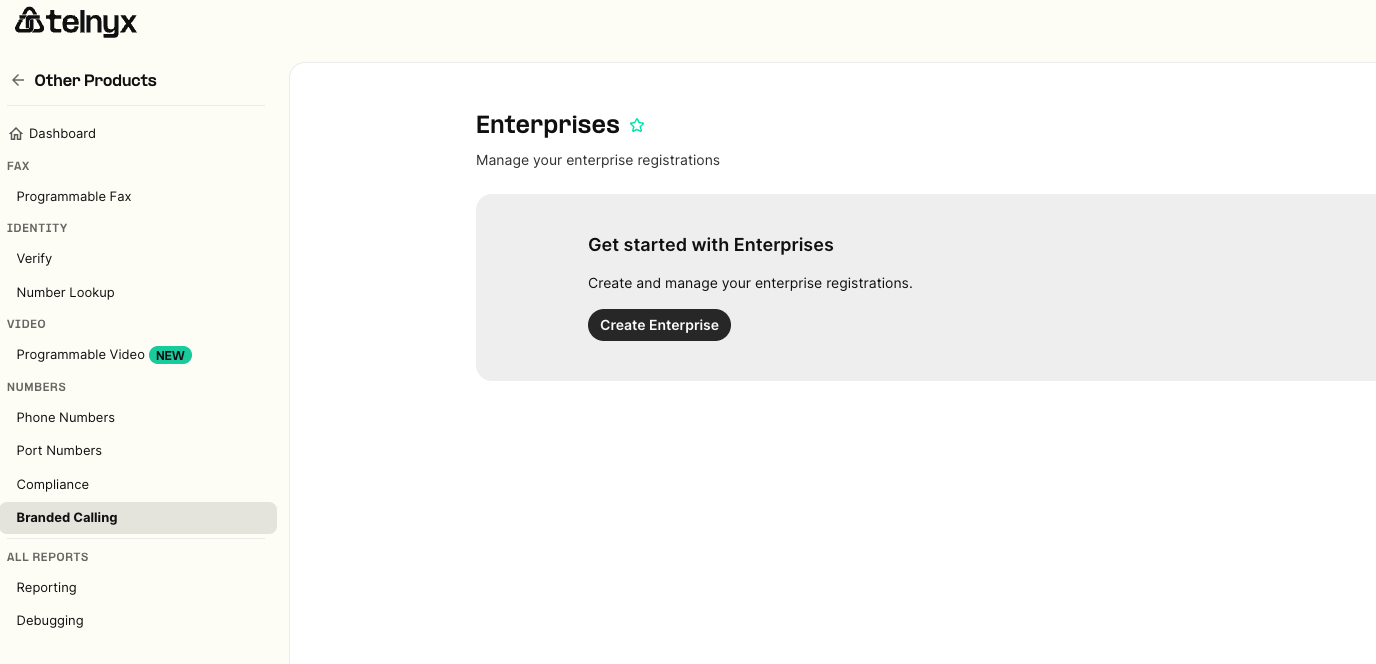
2. Open the Branded Calling area
In the portal navigation, go to Other Products → Branded Calling. On Branded Calling you will see options to create or edit your Enterprise setup.
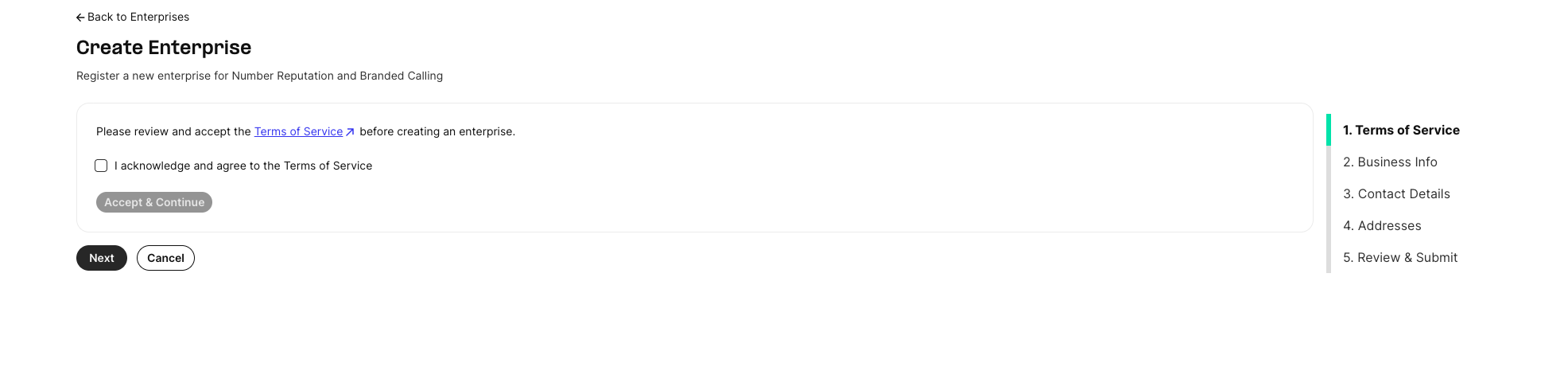
3. Accept Branded Calling terms
The first time you set up Branded Calling, you will be asked to review and accept the applicable terms. Read the terms carefully, then accept them to continue.
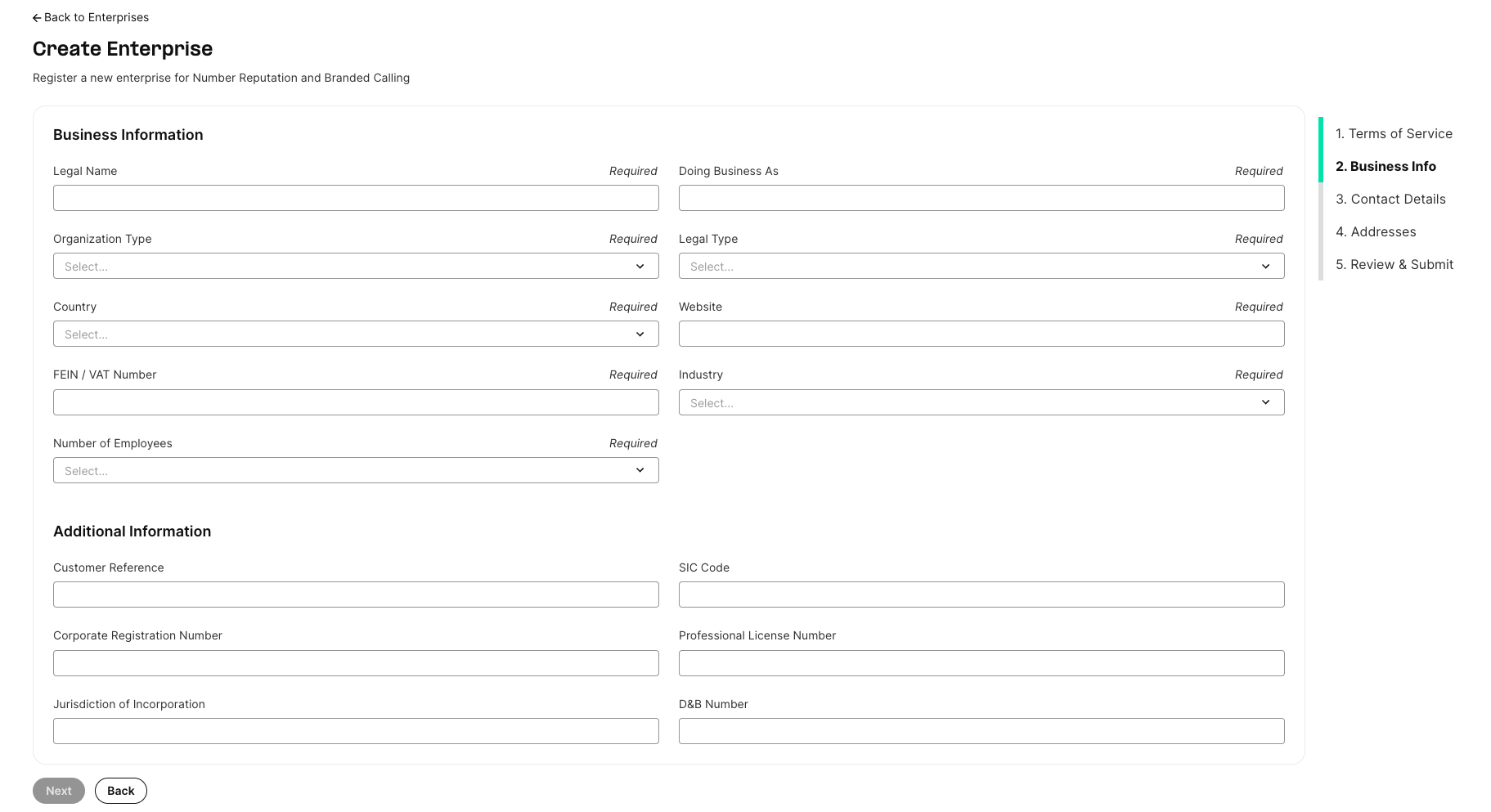
4. Create or select an Enterprise
Create a new Enterprise profile, or select an existing Enterprise if one has already been created for your organization.
When creating an Enterprise, enter the requested business information, contact details, and address information. Review the details before submitting.
5. Create a Display Identity Record (DIR)
Once your Enterprise profile is created, you will be able to create a Display Identity Record, or DIR.
DIR is the branded calling identity that recipients may see when your approved numbers place outbound calls through your SIP connections.
Create a new DIR under the appropriate Enterprise.

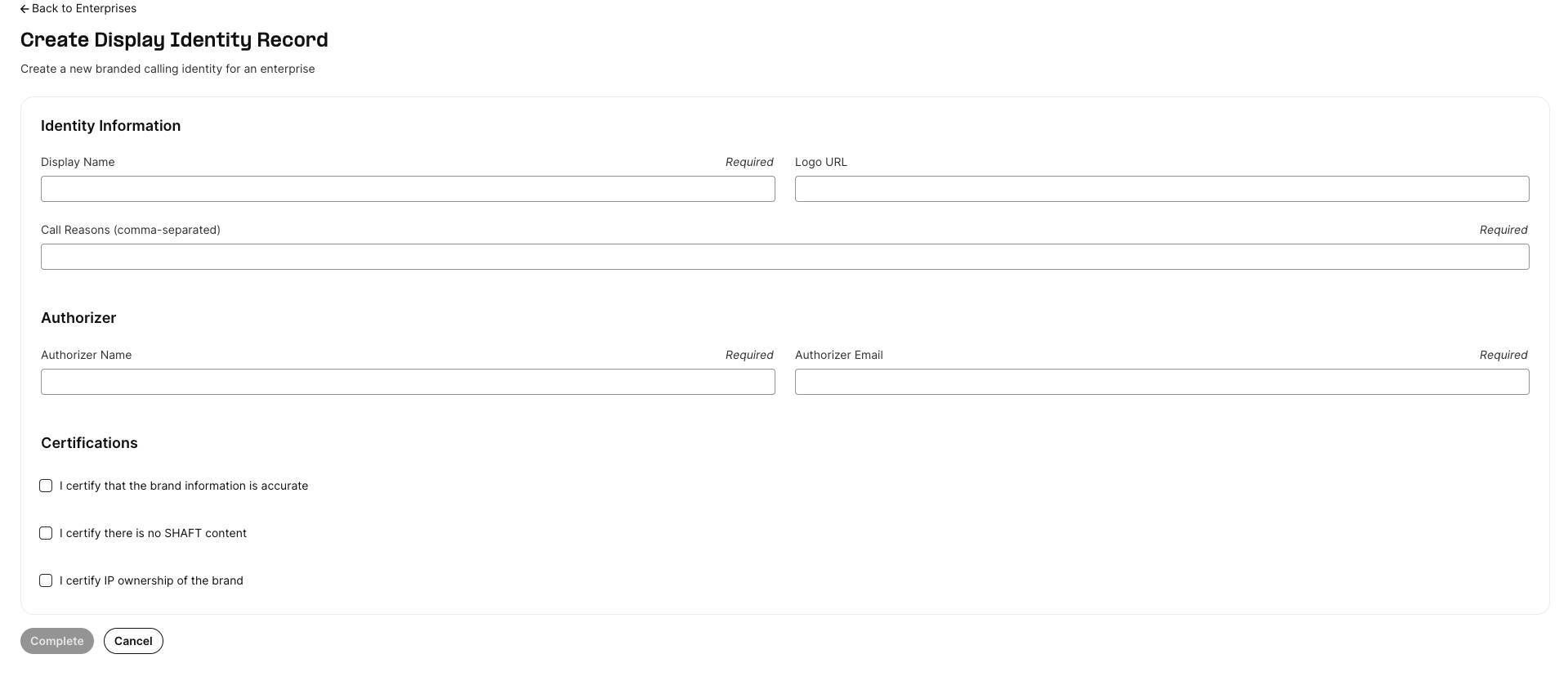
6. Enter your branded calling identity details
Complete the DIR form with the requested information. Depending on your account and region, this may include:
- Display name
- Logo or logo URL, if supported
- Call reason options
- Business certifications or attestations
- Brand contact information
- Supporting details requested for review
Use information that accurately represents your organization. Mismatched, incomplete, or unverifiable details may delay approval or result in rejection.
7. Submit the DIR for review
After reviewing your DIR details, submit it for review. Once submitted, the DIR cannot be used for Branded Calling until it is approved.
8. Wait for status updates
The DIR will move through review statuses in Mission Control Portal. Check the DIR detail page for the latest status, comments, or requested changes.
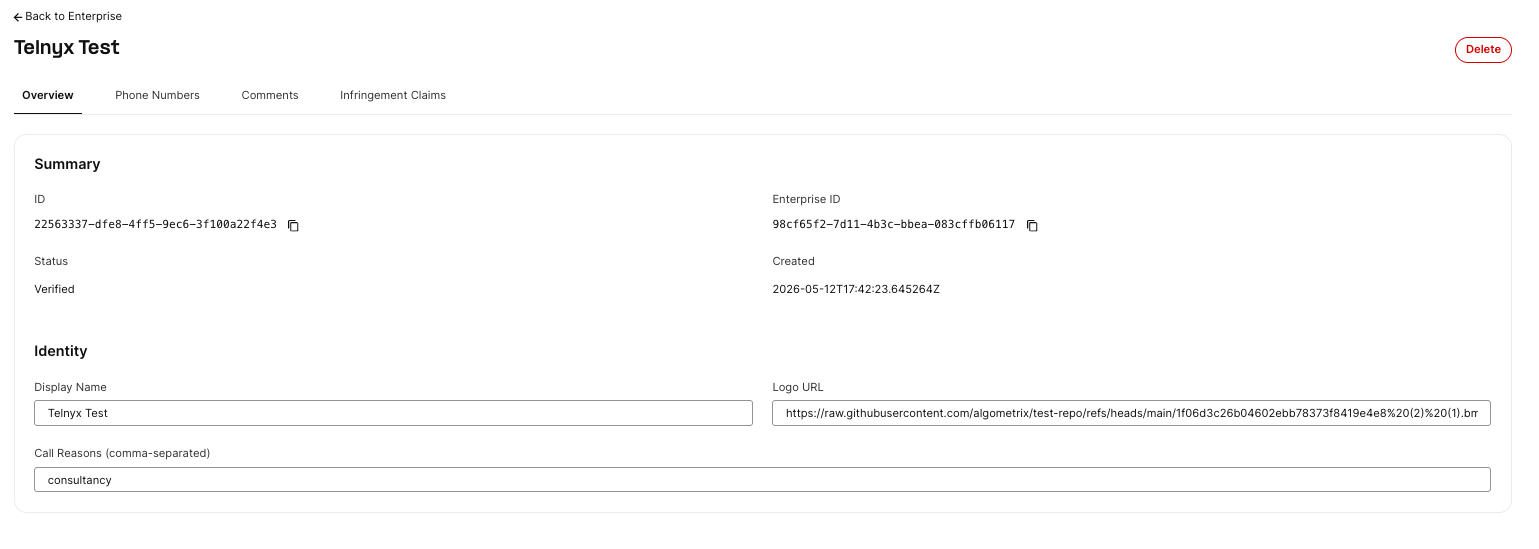
If the DIR is rejected or marked unsuccessful, review the comments in the portal and update the DIR as instructed before resubmitting, if resubmission is available.
9. Add phone numbers after approval
After the DIR is approved, add the Telnyx phone numbers you use for outbound SIP trunking calls. Phone numbers must belong to your account and meet the eligibility requirements shown in the portal.
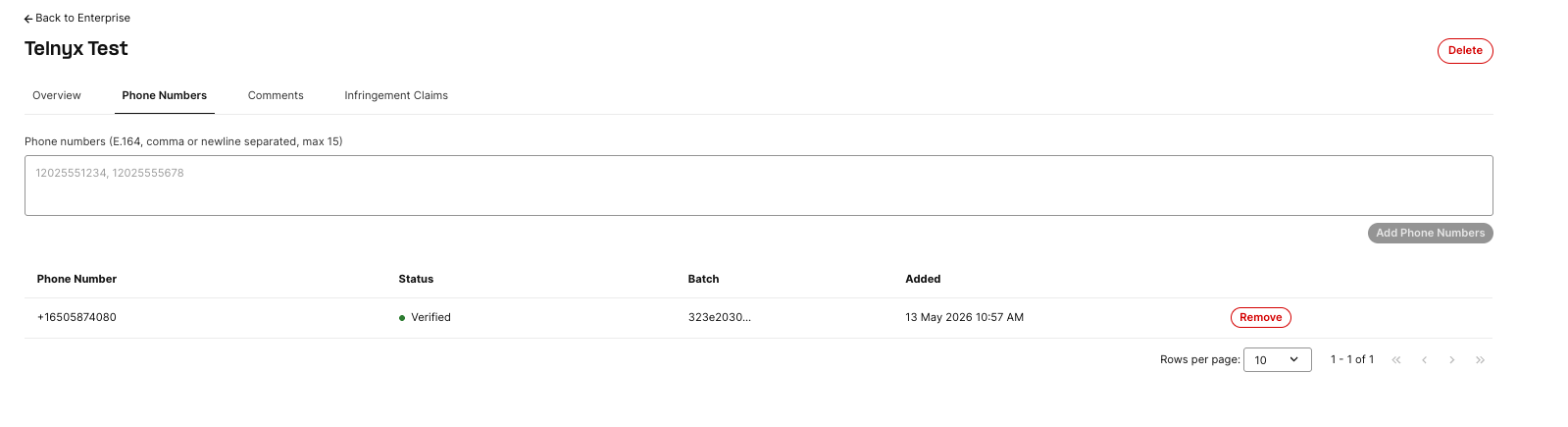
After you add numbers, wait for the phone number status to show that the numbers are approved, active, or otherwise ready for Branded Calling in the portal.
Once the DIR and phone numbers are approved, outbound SIP trunking calls from those numbers may include your approved branded calling information where supported by the receiving carrier and device.
10. Place calls from your SIP connection
After your DIR is approved and phone numbers are active for Branded Calling, place outbound calls through your SIP connection as you normally would. When you dial from an approved number, Telnyx includes your branded calling information in the call signaling where supported.
No additional SIP headers or configuration changes are required on your SIP connection. Branded Calling is applied automatically based on the approved DIR and number association.
Troubleshooting
My brand is approved, but it is not showing on calls
Branded Calling display depends on several factors outside Telnyx's direct control, including receiving carrier support, device support, call destination, and downstream verification. Some calls may show your branded information while others do not.
Check that:
- The DIR is approved.
- The calling number is added to the approved DIR.
- The phone number status is approved or active for Branded Calling.
- You are placing the outbound call from the approved number through your SIP connection.
- Enough time has passed for provisioning and downstream propagation.
If the setup looks correct and branding still does not appear after the expected provisioning window, contact Telnyx Support with the calling number, destination number, call timestamp, and examples of affected calls.
I cannot add a phone number
A phone number may be blocked from being added if it is not eligible, not owned by your account, already associated with another branded calling identity, not active, or not in the expected format.
Confirm that:
- The DIR is approved.
- The number belongs to your Telnyx account.
- The number is active and eligible for Branded Calling.
- The number is not already assigned to another DIR.
- You entered the number exactly as requested by the portal.
My DIR was rejected or marked unsuccessful
Review the comments or rejection reason in Mission Control Portal. Common causes include incomplete business information, display names that do not match the verified business, unsupported or mismatched logos, missing contact details, or unverifiable brand information.
Update the DIR with accurate information and resubmit if the portal allows it. If you are unsure what to change, contact Telnyx Support.
Branded Calling works for some recipients but not others
This can happen. Branded Calling presentation depends on the receiving carrier, device, and network path. Approval means your brand and numbers are eligible to send branded information, not that every carrier or device will display it.
How long does provisioning take?
Review and activation times can vary. DIR review, phone number approval, and downstream propagation may each take time. Use the status shown in Mission Control Portal as the source of truth. If a status has not changed for longer than expected, contact Telnyx Support.
When should I contact Support?
Contact Telnyx Support if:
- You do not see Branded Calling in Mission Control Portal.
- Your DIR is rejected, and the reason is unclear.
- A phone number cannot be added even though it appears eligible.
- A phone number remains pending or inactive longer than expected.
When contacting Support, include your Enterprise name, DIR name, affected phone numbers, current status, and recent call examples if the issue is display-related.
FAQ
Does Branded Calling guarantee my business name or logo will appear on every call?
No. Branded Calling attaches verified identity information to your call signaling, but whether that information is displayed depends on the receiving carrier's infrastructure, the recipient's device, and the network path. Not all carriers or devices support the additional identity fields, and some intermediate carriers may not forward them even though the signaling is RFC-compliant. See Why Branded Calling may not appear on every call for details.
Can I use any Telnyx number?
Only eligible, verified Telnyx numbers that belong to your account can be used. The portal will prevent or flag numbers that cannot be added.
Can one phone number be assigned to multiple branded identities?
No. A phone number can only be associated with one approved Display Identity Record at a time. If you need to move a number to a different DIR, remove it from the current DIR first.
Can I change my display name or logo after approval?
Yes, you can edit certain details of an approved DIR. Changes to display name, logo, or call reasons may require another review before they take effect. Check the DIR detail page in Mission Control Portal for available edit options based on the current status.
Why do I need to create an Enterprise?
The Enterprise represents the verified organization behind the branded calling identity. It helps ensure that branded information shown to call recipients is tied to a real, authorized business.
Do I need to change my SIP connection configuration to use Branded Calling?
No. Branded Calling is applied automatically based on the approved DIR and number association. No additional SIP headers or configuration changes are required on your SIP connection. Once your numbers are approved, outbound calls from those numbers will include branded calling information where supported.
What call information should I send Support if branding is not visible?
Send the calling number, destination number, call date and time, the approved DIR name, and a brief description of what the recipient saw. Screenshots from the receiving device are helpful when available.