Custom voicemail greetings let you personalize what callers hear when they reach your voicemail on a Telnyx phone number. You can use the default text-to-speech greeting or create a custom TTS greeting with your own message.
How voicemail greetings work
When someone calls your Telnyx number and the call goes to voicemail, the caller hears a greeting before being prompted to leave a message. Telnyx supports two greeting modes:
| Mode | What callers hear |
| Default TTS | A standard Telnyx greeting that includes the dialed number (e.g., "This is a voicemail service for [number]. Please leave your message after the tone."). |
| Custom TTS | A greeting message you write, rendered with text-to-speech and saved as an audio file. |
Custom TTS greetings are rendered and stored when you save them — they are not regenerated on every call. If a custom greeting is missing or cannot be played for any reason, the system automatically falls back to the default greeting.
Note: Custom voicemail greetings are configured per phone number. Each number can have one active greeting at a time.
Before you begin
- Voicemail must be enabled on your Telnyx phone number. You can enable voicemail in the Mission Control Portal under your number's settings, or via the Telnyx API.
- An active Telnyx phone number that you own and manage on your account.
- Portal access with permissions to manage phone numbers and voicemail settings.
- A SIP Connection on the number — voicemail is available for SIP Connections.
Set up a custom voicemail greeting
Option 1: Use the default greeting
If you do not configure a custom greeting, Telnyx uses the default greeting automatically. The default greeting speaks the dialed number and prompts the caller to leave a message.
No configuration is needed; this is the default behavior when voicemail is enabled.
Option 2: Create a custom TTS greeting
A custom TTS greeting lets you write your own message and have it rendered with text-to-speech.
Through the Mission Control Portal
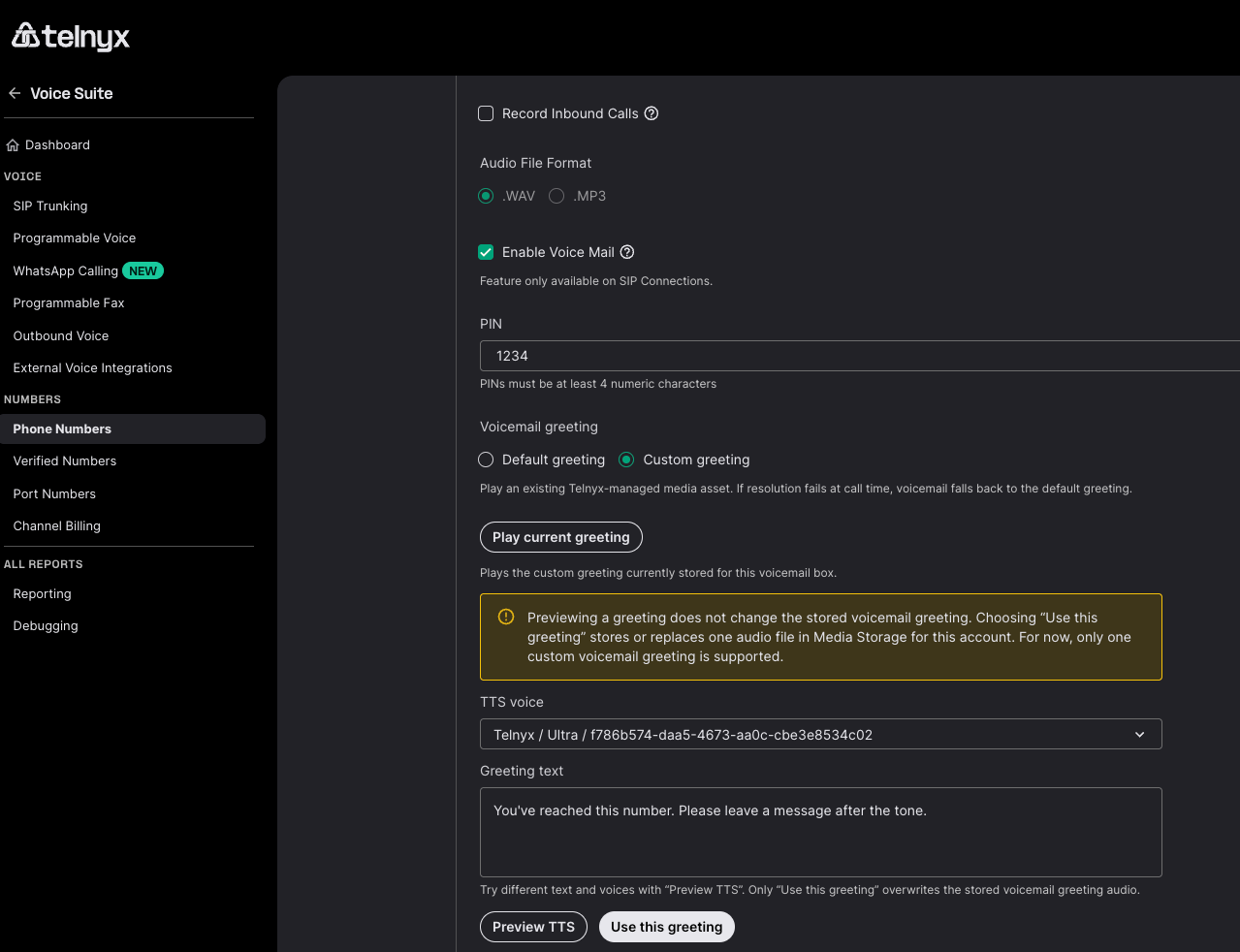
- Sign in to the Mission Control Portal.
- Navigate to Phone Numbers and select the number you want to configure.
- Open the Voice tab and go to Voicemail settings for that number.
- In the Greeting section, select Custom greeting.
- Select Play Current Greeting to reproduce your current greeting
- Choose a TTS voice from the voice selector dropdown.
- Enter your custom greeting text in the greeting text field.
- Click Preview TTS to hear how your greeting will sound. Previewing does not change your stored greeting.
- Click Use this greeting to render and activate the greeting.
When you save, Telnyx renders your greeting text into audio and stores it. The next time a caller reaches voicemail on that number, they will hear your custom greeting.
Note: Only one custom voicemail greeting is supported per number. Saving a new greeting replaces the previous one.
Through the Telnyx API
Before setting a custom greeting via the API, upload your greeting audio to Telnyx using POST /v2/media. Then reference the returned media_name in the voicemail configuration:
curl -X POST "https://api.telnyx.com/v2/phone_numbers/{number_id}/voicemail" \
  -H "Authorization: Bearer YOUR_API_KEY" \
  -H "Content-Type: application/json" \
  -d '{
    "enabled": true,
    "pin": "1234",
    "greeting": {
      "mode": "custom_greeting",
      "media_name": "custom_greeting_acme"
    }
  }'
Note: The media_name field references an audio file uploaded via POST /v2/media. When using the Mission Control Portal, the greeting text editor handles TTS rendering and media upload automatically.
Manage your greeting
Check which greeting is active
You can view the active greeting mode in the Mission Control Portal under the number's voicemail settings, or via the API:
curl "https://api.telnyx.com/v2/phone_numbers/{number_id}/voicemail" \
  -H "Authorization: Bearer YOUR_API_KEY"
The response includes the current greeting mode and media information.
Revert to the default greeting
To switch back to the default Telnyx greeting:
Through the Mission Control Portal
- Go to the number's Voicemail settings.
- In the Greeting section, select Default greeting.
- Click Save.
Through the API
curl -X POST "https://api.telnyx.com/v2/phone_numbers/{number_id}/voicemail" \
  -H "Authorization: Bearer YOUR_API_KEY" \
  -H "Content-Type: application/json" \
  -d '{
    "enabled": true,
    "pin": "1234",
    "greeting": {
      "mode": "default"
    }
  }'
Replace a custom greeting
To replace an existing custom greeting, simply save a new one. Setting a new greeting automatically replaces the previous one. There is no retention of replaced or deleted greeting audio — it is removed from storage.
Limits and guidelines
- One active greeting per number: Each phone number can have only one active greeting at a time.
- Fallback to default: If a custom greeting cannot be played (for example, due to a temporary storage issue), the system automatically plays the default greeting.
- Replaced greetings are deleted: There is no retention period or recovery option for replaced greeting audio.
FAQ
What happens if I do not set a custom greeting?
Telnyx uses the default TTS greeting, which speaks the dialed number and prompts the caller to leave a message.
Can I use different greetings for different numbers?
Yes. Greetings are configured per phone number. Each number can have its own custom greeting or use the default.
What TTS does Telnyx use for voicemail greetings?
Telnyx generates voicemail greetings using its built-in TTS technology. Customers can choose from the available TTS engines to select the voice and quality that best suit their preferences.
Can I have multiple greetings and switch between them?
No. Each number can have one active greeting at a time. To switch greetings, save a new one (Use this greeting), it replaces the previous greeting.
What happens to my old greeting when I replace it?
The previous greeting audio is deleted from storage. There is no retention period or recovery option for replaced greetings.
Does the greeting play for both voicemail deposit and retrieval?
The greeting plays when a caller is connected to voicemail to leave a message. Voicemail retrieval (checking your messages) has its own prompts.
Related Articles